
How far ahead pages are created (2 or 4 weeks)
Meeting Notes pages are created for a rolling window of upcoming weeks, not for the whole year. You choose the size of the window in Step 7 — Meeting notes.
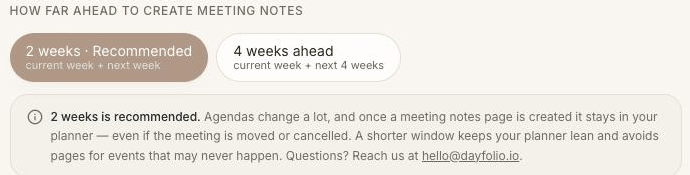
The two options
2 weeks (recommended) — the current week plus next week.
4 weeks ahead — the current week plus the next four full weeks, five calendar weeks in total.
The window is counted in calendar weeks, not in days from today. On a Thursday with "4 weeks ahead", pages exist for the rest of this week and the four following weeks; a meeting in the fifth week gets its page once the calendar rolls into a new week and the planner syncs.
Why a short window works
Agendas change: meetings get moved, renamed and canceled. Once a Meeting Notes page exists, Dayfolio keeps it — you may already have written on it — so a page created months in advance for a meeting that never happens would stay in the planner. A short window means pages are created when the meeting is close and likely to happen, and the planner stays lean. Pick 4 weeks if you prepare for meetings well in advance.
New pages arrive with every sync
Each sync (the daily one, Sync now, or Smart Sync+ during the day) creates pages for meetings that have entered the window since the last generation. Nothing to do on your side. The Upcoming tab of the Meetings Index lists what's in the window right now.
Meetings that already happened
Pages are created ahead of a meeting, so a meeting from before you started using Dayfolio doesn't have one. To keep notes for it, open the Day View of that date on your reMarkable and use ⋮ menu (three dots) → Add note page — see Add a note page anywhere in your planner.
Changing the window
Switch between 2 and 4 weeks in Step 7 and press Sync now. Widening the window adds pages for the extra weeks at the next generation; narrowing it doesn't remove pages that already exist.