
Meeting Notes settings: which events get a page
Every event Dayfolio treats as a meeting gets its own Meeting Notes page in the planner — the page you reach by tapping the event on the Day, Week or Month View. Step 7 — Meeting notes is where you decide which events qualify and how far ahead the pages are created. Open it from your planner page at app.dayfolio.io → Edit settings → Step 7.
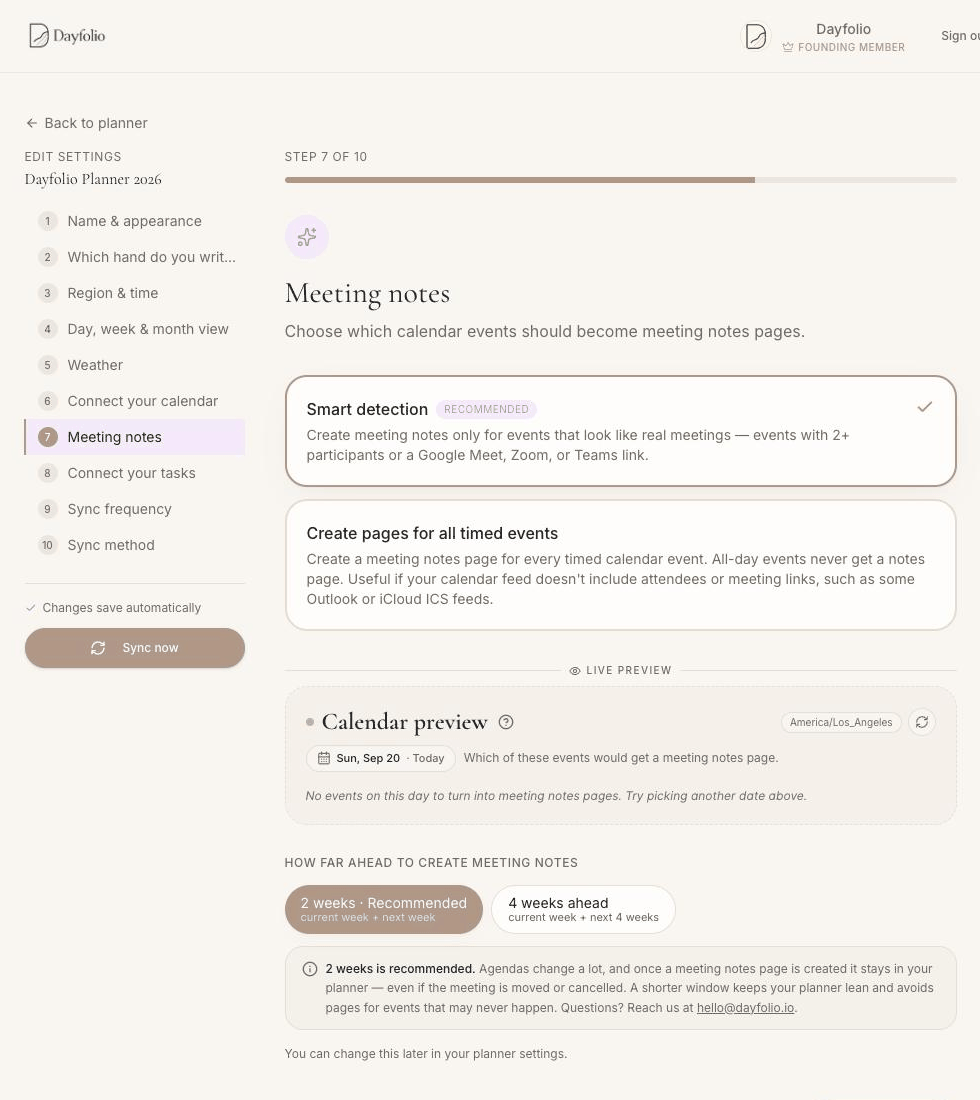
Detection mode
Smart detection (recommended) — a page is created only for events that look like real meetings: two or more participants, or a Google Meet, Zoom or Teams link. Lunch, gym and personal reminders stay plain events.
Create pages for all timed events — every timed event gets a page. Useful when your calendar feed doesn't carry attendees or meeting links (some Outlook and iCloud iCal feeds, booking tools) or when you want notes for appointments you created yourself.
All-day events never get a notes page in either mode. Which mode suits you is discussed in Smart detection or all timed events?.
How far ahead
2 weeks (recommended) — the current week plus next week.
4 weeks ahead — the current week plus the next four full weeks.
Pages are created during each sync for the meetings that fall inside the window; as the weeks roll forward, new meetings get their pages automatically. Why the window is short, and how the weeks are counted, is in How far ahead pages are created.
Live Preview
Between the two settings is a Live Preview: pick any day of this week or next and see which of its events would get a Meeting Notes page under the current mode. It's the quickest way to check a setting before regenerating the planner — switch from Smart detection to all timed events and watch the list change.
Apply the change
Settings save automatically; press Sync now to regenerate the planner. New pages appear on the tablet after the sync; pages that already exist stay where they are, with your handwriting.
What the page looks like
The layout of a Meeting Notes page — badges, attendees, description, notes area, action items — is described in Meeting Notes pages, and the two index pages that list them in Meetings Index and Series pages.