
Tasks Index
The check icon in the header opens the Tasks Index: every task from your connected task apps, in one place. It's a reading view — to tick a task off, tap it to jump to its Day View.
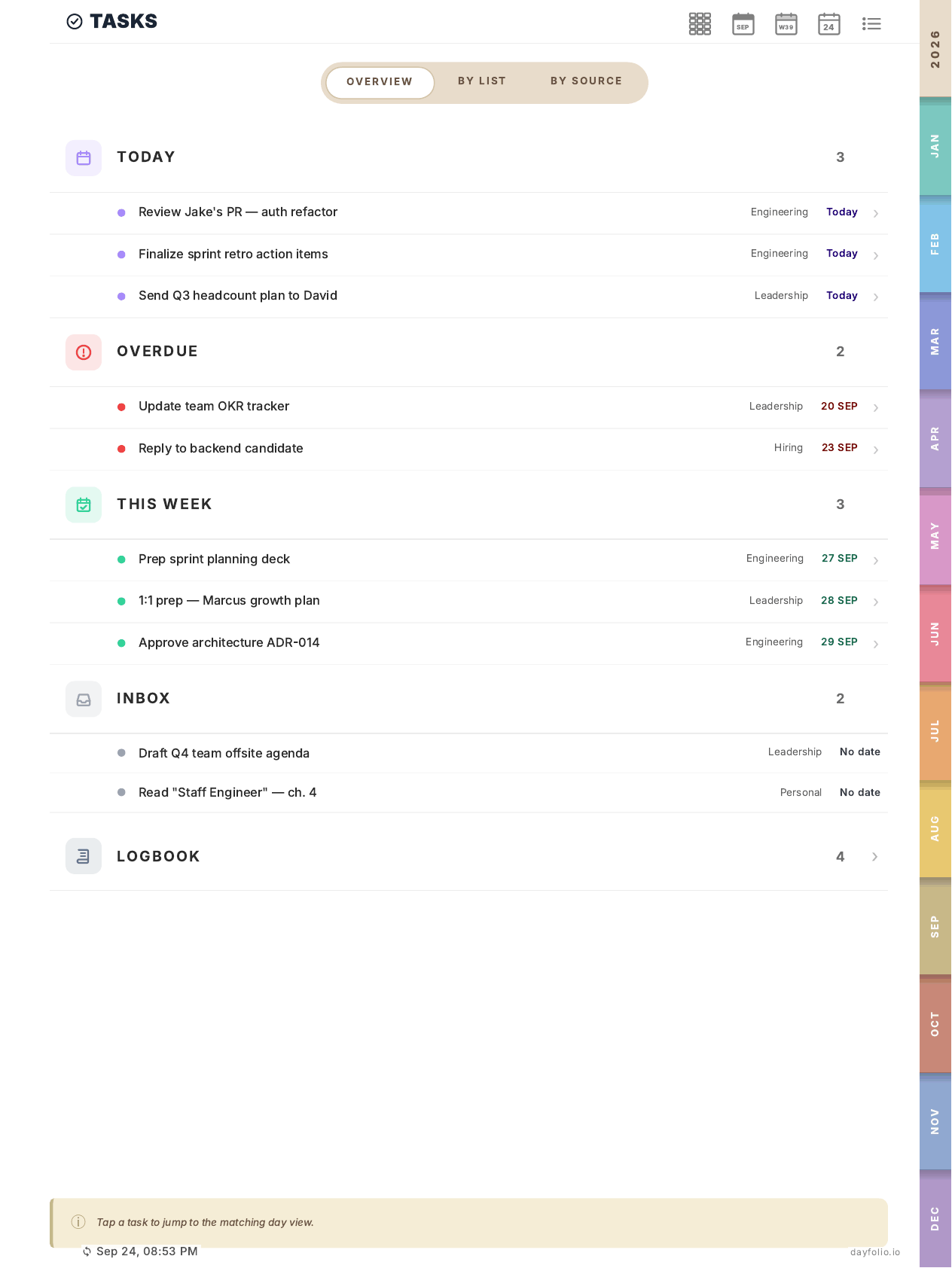
Overview
Tasks are grouped into sections, each with a count:
Today — due today.
Overdue — past due and still open, with the original due date in red.
This Week — due later this week.
Inbox — tasks without a due date. They don't appear on any Day View; give them a date in your task app if you want to tick them off from the planner.
Logbook — completed tasks.
Each row shows the task, its list or project, and its date. Sections with many tasks show the first few and a link to a detail page ("+1 more").
By list and By source
Two more tabs at the top:
By list — tasks grouped by project or list (Engineering, Personal, …), keeping the list's color.
By source — grouped by app: Todoist, Google Tasks, Microsoft To Do, Microsoft Planner.
Each group has its own detail page with the complete list.
What the index can't do
Check off tasks. Completion by pen works only on the Day View, for tasks that have a due date. Tap the task in the index to get there.
Filter which tasks are synced. Every active task from every list comes in. See Tasks in your planner: an overview.
The index is rebuilt on every sync, so it's only as current as your last sync (see the footer).